

So recently, I was involved in some discussions around some Microsoft Sentinel resources on an Azure Subscription that needed to be handled before the Cloud Solution Provider (CSP) Subscription was decommissioned.
While the usual process would be to transfer a CSP Subscription to another CSP Provider, this wasn’t going to be practical, but we did have access to some Azure Credits as a part of the Microsoft Partner Benefits.
Foolish me thought that this was going to be a straightforward bait and switch – this turned into about a full day’s worth of work!
For the sake of convenience in managing resources in Azure, we can move resources and resource groups between Subscriptions, which as basically billing containers, by selecting the Move option and specifying the target subscription and/or resource group.
Before commencing the move, you validate the resources and the viability of the move, and if you receive the all clear, you commence the move, and it takes a bit of time depending on the volume of the resources.
However, in this scenario, when I selected Microsoft Sentinel and the associated Log Analytics Workspace and QueryPack, I received errors on both resource group move validations.
The errors were:
Resource move is not supported for resources that have plan with different subscriptions.
Resources are: ‘Microsoft.OperationsManagement/solutions/SecurityInsights’
Resource move is not supported for resource types ‘Microsoft.OperationalInsights/querypacks’
So, the latter was a clear message – just can’t, but the former was a bit confusing.
As any person in tech would do, you consult the oracle… or in this case, multiple oracles from Search Engines to AI – have you met ChatGPT?
Anyway, through some research and discussion, I found that the issue is that if there are any solutions or services attached to a Log Analytics Workspace (LAW), you will not be able to move it to another subscription.
On top of that, Microsoft does not support the Workspace if it has been moved!
At this point, mild panic settled in – this needed to be addressed quickly due to the looming deadline.
Through reading and responses, it seemed that the Microsoft Sentinel Solution itself could be removed (including all data around config, queries, etc.), and then the LA Workspace could be moved. After the move completes, I could then re-enable Sentinel on the LAW – but would need to reconfigure it again, and it would also no longer be under support.
While looking through the Sentinel Settings blade, I did notice something in there.
Workspace manager configuration.
Can’t say I have been on top of the latest with Microsoft Sentinel, but this mentioned some relevant information in the description:

So the wording around a Central workspace being able to consolidate content (config only, not data or connectors) and publish to other Member workspaces!
Just need the Microsoft Sentinel Contributor role on the central workspace and at least two Sentinel workspaces to start.
This sounds like the perfect feature, right?
Well, I clicked on the link to check the documentation – it’s still in Preview. At this point, after some brief debate (mostly self-confliction) with ChatGPT, I was going to take a chance.
The Plan became:
- Set the original as Central Workspace.
- Create a new LAW in the sponsorship subscription.
- Enable Sentinel + connectors there.
- Add it as a Member Workspace.
- Push content via Workspace Manager.
- Remove Sentinel from the old LAW → Move LAW → Re-enable Sentinel.
So I set about with the plan, and to be honest, it was pretty smooth following the documentation. Now, to cover bases, I exported a bunch of data first, historic alerts to CSV, and any Analytics and Automation Rules.
Now, with anything new, I expect the worst – when publishing the Content items to push to the new Workspace, there was an error. As per the documentation, a single error will show the publish as failed. With some poking, it seemed to have failed to push through an Automation Rule that referenced an invalid/non-existent playbook. I verified this by attempting to import just this rule, which threw the same error. So, since it was doing nothing, I chose to omit it.
Always expect one or two content items to fail; investigate if they’re critical or safe to omit.
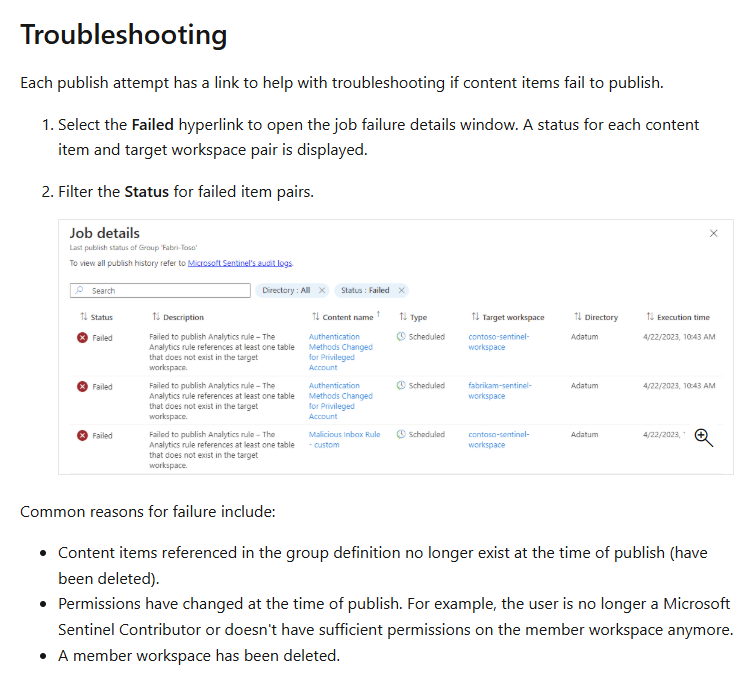
The documentation did provide some common scenarios for the content items to fail.
Also worth noting that there is a maximum of 2000 operations per workspace group, so you may need to strategically set up how many Member workspaces there are in a group to keep the number of operations when publishing!
With the new Sentinel workspace good to go, I added in the Data Connectors – and if you’ve looked into it, the Microsoft first-party Data Connectors are not billed, so you can experiment in this space!
Moment of truth, I removed Sentinel from the original workspace. It was quite quick!
Next, I prepared the resource group for the move, and validation was OK!
Completed the move and re-enabled Sentinel on that workspace.
While this was taking place, I made sure to generate some activity to ensure the new Data Connectors were operational and logging data. To not double up on log ingestion, I made sure to disable the Data Connectors on the old Sentinel workspace, as these can light back up due to being authenticated in the past, and the configuration stays intact!
Note: don’t forget to re-configure any Azure Activity through Diagnostic Settings to point to your new workspace!
Ran some queries with Union workspace(“old”).”activity”, workspace(“new’).”activity”, and it was able to return logs from both the old and new workspaces! Yay, some victory!
Lastly, the QueryPack – since you can’t move this, as a workaround you can export and import it as a Custom Template under the Resource Group. If you have hunting queries covered by Workspace Manager you might be fine. It was a Default Query Pack, so I wasn’t overly stressed, but for completionist sake, it had to be done!
There we have it, I did a thing – and with minimal pain! Instead of using it as a 1-to-Many architecture, I leveraged it as a 1-to-1 architecture to replicate config to assist me in consolidating logging data across Azure Subscriptions.
In more complex scenarios, you can have Co-Management or even a hierarchy of Sentinel Workspaces

Key takeaways:
- Remove Sentinel before moving a LAW.
- Workspace Manager (even in Preview) is your friend for content item/config migration.
- QueryPacks must be exported/redeployed.
- Always validate connectors and diagnostic settings post-move.
- A moved workspace keeps logs but isn’t officially supported by Microsoft for production Sentinel.
It was a fairly simple configuration of Sentinel, and if there were any playbooks/Logic Apps linked to it, there may have been a lot more work around re-pointing resource IDs and other namespaces to ensure workflows still functioned, but I’ll take the small victory.
Disclaimer: Your Mileage May Vary (YMMV), Good Luck Have Fun (GLHF) when you test this out in your test environments!
 M365 Senpai