

Navigating the Complex Landscape of Multi-Tenant Email Management in Outlook
In the dynamic world of email management, navigating multiple tenant accounts within Outlook presents a series of intricate challenges. This article unfolds practical solutions, enriched with real-world scenarios and strategic approaches, to cultivate a secure and efficient multi-tenant email management ecosystem.
Unpacking Authentication Challenges: A Real-World Scenario
Recently, I encountered a challenging scenario with a client having issues in Outlook. The client had added two work email accounts, but the second one, from a different company, failed to authenticate.
In troubleshooting, we removed all traces of the credentials, a standard initial step. However, upon inspection of the client tenant settings, it was clear that Multi-Factor Authentication (MFA, a crucial security protocol that requires users to present two or more verification factors to gain access.) was enforced, but surprisingly, Outlook wasn’t progressing to the Modern Authentication stage. Modern Authentication is Microsoft’s more secure method based on Active Directory Authentication Library (ADAL) and OAuth 2.0.
App Passwords: A Temporary but Risky Respite
In our scenario, the use of App Passwords became a temporary solution to bypass the MFA challenges. However, it’s essential to comprehend the potential risks of this approach. App Passwords act as static keys, allowing access without multiple verification stages, thus posing potential security risks. Learn more about App Passwords.
Tenant Admins – Checking/Enabling App Passwords
Under the Active Users menu in the Microsoft 365 Admin Center, you can access Multi-Factor Authentication Settings. You may be met with the following landing page; you will need to click on Legacy per-user MFA.
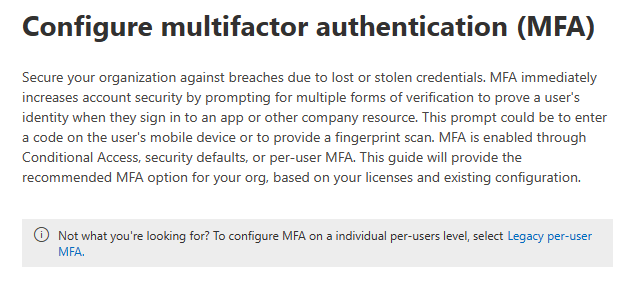
Then click on “service settings” at the top (it’s not an obvious tab)

Harnessing Microsoft’s Security Mechanisms: A Strategic Approach
Microsoft Entra ID (formerly Azure Active Directory) has evolved to introduce features like Conditional Access Policies and Application Protection Policies, emphasising the importance of device compliance and security. For a deeper understanding, you can refer to Microsoft’s official documentation on Conditional Access Policies and Application Protection Policies.
Cross-Tenant Woes
Working across different tenants in M365 Apps presents its challenges, such as potential sign-in loops or sync issues when accessing files from different tenants. These cross-tenant issues often manifest as continuous prompts for credentials, making it difficult to work seamlessly across multiple organizational accounts.
Outlook on the Web (OWA): A Versatile Alternative
OWA emerges as a versatile alternative, allowing for seamless navigation between multiple email accounts. For a more enriched user experience, consider exploring OWA as a Progressive Web App (PWA) on Microsoft Edge.
Conclusion: Navigating the Path of Multi-Tenant Email Management
Navigating the realms of multi-tenant email management requires a harmonious blend of strategic foresight, practical solutions, and robust security protocols. We invite you to share your experiences and insights into managing multi-tenant emails effectively in the comments section below. Your shared wisdom could be the beacon of guidance for others navigating similar challenges.
 M365 Senpai