

Bit of a false start to my post-hiatus work with back to back child viruses being passed onto me has put me behind a bit.
A throwback to Last Tuesday, that titbit of exciting news teased in the last blog is that I have joined Adam Fowler and Brett Moffett as a budding associate in co-hosting the Adelaide Microsoft IT Pro Community.
I will essentially covering a brief news digest on all things Microsoft Office 365 at the start of each month’s Meetup event.
As promised, I have put together the ol’ Restrict O365 Group Creation script and added some automation-y flair to it.
Nothing overly complex, the script now asks you whether or not you wish to disable Group creation for all users. If you answer Yes, then you will have to enter the Name of the Group of users you wish to manage/creation O365 Groups.
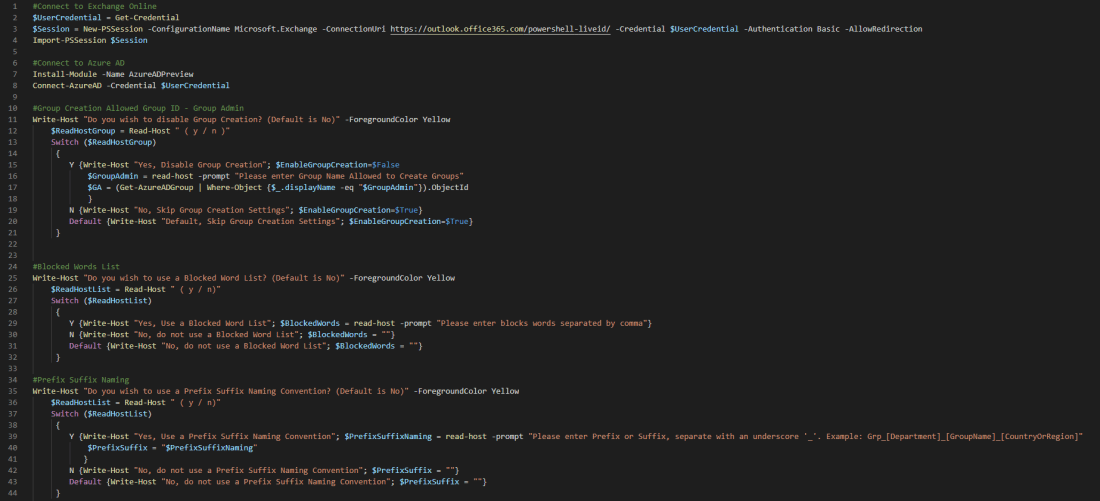
Now, from a Governance point of view, I have added in two options for Blocked Words List and Prefix-Suffix Naming Convention.
If you answer yes to either question, you can enter the list of Blocked Words separated by comma and/or set a Naming Convention for your O365 Groups.
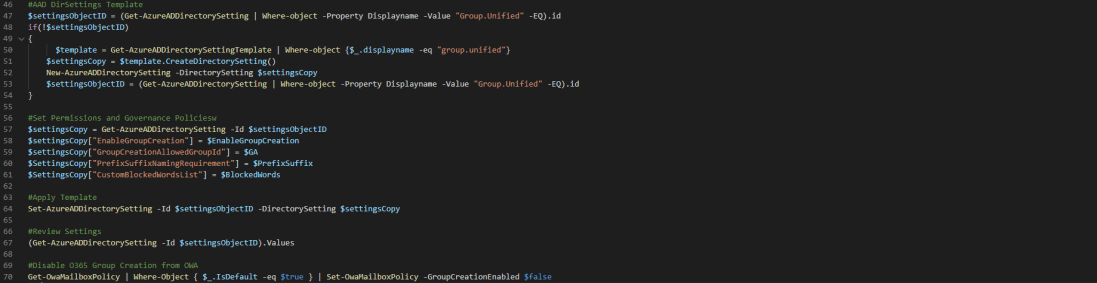
You can check out the new script over at GitHub
Before running this script in any way, please review documentation to understand what and where the changes applied will affect.
Additionally, I want to highlight this amazing O365 Groups infographic by Matt Wade (icansharepoint.com) who also created the O365 Periodic Table
Woo 80-day streak in Duolingo – French
 M365 Senpai

One thought on “Restricting O365 Group/Team Creation & Governance Policies”