

Office 365 Groups, essentially the backbone of O365:
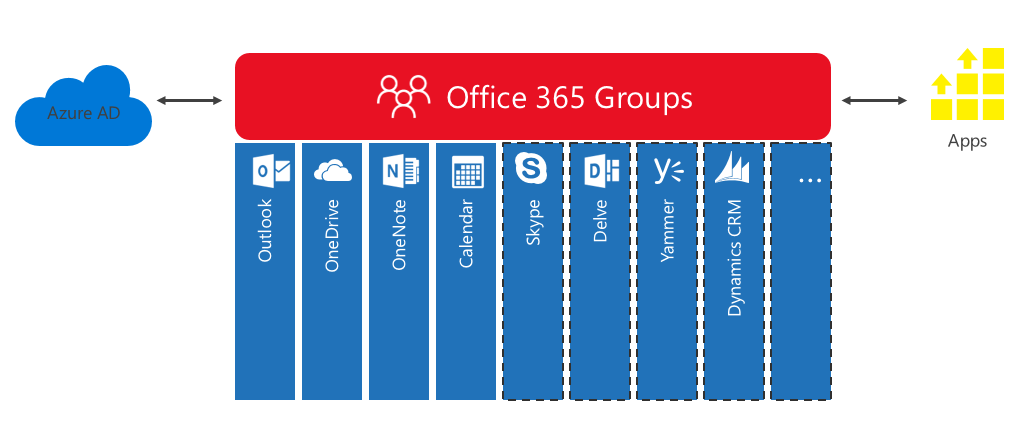 Image courtesy of Microsoft – https://dev.office.com/blogs/GroupsRESTAPI
- Each Team you create in MS Teams creates an Office 365 Group;
- Each SharePoint Site you create adds an Office 365 Group;
- Planner creates an O365 Group per Plan you add;
- You can even convert your current Distribution Groups to Office 365 Groups!
This is all well and good, but by default these are unrestricted to users in the Tenancy.
This means that anyone can create a new Office 365 Group from within Outlook!
Same goes for Teams, anyone can create up to 250 teams – Global Admins can create as many as they want – though Azure AD will impose a hard limit at around 500,000 items.
This is where you want to start keeping things under control, however you will not be able to do this easily in the Office 365 Admin Console. That’s right, old mate PowerShell to the rescue.
As usual your ‘go to’ may be just to Google (or Bing!) for instructions/advice – and you will find yourself ending up at Microsoft’s support articles.
However, following the seemingly straight forward steps results in you ending up with a sea of red text.
In the above referenced article you will discover that Step 7 just will not work.
This can be followed by frustration, and then desperation.
Not being able to progress further with this method, you dig deeper and end up at TechNet’s articles.
This provided some new methods, so rather than try to continue on this tenancy we use a different one that has not been modified yet.
Voila! It works! However, you find you cannot modify once you have updated the AzureADDirectorySetting.
Setting this small success aside, we head back to the original tenancy we are wanting to modify.
Succumbing to defeat, we contact the Partnered Support – the situation is explained, and explained again, and again, aaaaand again. Finally it is passed onto Microsoft to look into, and explained it again… After much deliberation, it is escalated to our hero of the story, Chester.
The parameter -Id does not exist, at least not anymore. The article at the time was last updated in February 2018, and still references AzureADPreview module for PowerShell. AzureAD V2 module is now Generally Available and appears to work.
The article now reads as last updated 18 April 2018 – however the erroneous syntax/step still exists.
Though under Step 3 “ObjectID” is mentioned in bold…(MsolService though)
-ObjectId is the correct parameter to use here.
Strong confusion between AzureAD and MsolService syntaxes.
So the creation of Office 365 Groups was restricted to a on premises Mail Enabled Security Group that is a member of a Security Group in Cloud in O365.
Here are the commands used:
Connect-AzureAD
Get-AzureADDirectorySetting
(Get-AzureADDirectorySetting).values
Get-AzureADGroup -SearchString “GroupName”
$template = Get-AzureADDirectorySettingTemplate | ?{$_.displayname -eq “Group.Unified”}
$setting = $template.createdirectorysetting()
$setting = Get-AzureADDirectorySetting | ?{$_.displayname -eq “Group.Unified”}
$setting[“EnableGroupCreation”] = $False
$setting[“GroupCreationAllowedGroupId”] = (Get-AzureADGroup -SearchString “GroupName”).objectid
Get-AzureADDirectorySetting
Id DisplayName TemplateId Values
— ———– ———- ——
2033b6c4-1XXXXXXXX Group.Unified 62375ab9-6XXXXXXX {class SettingValue {…$setting[“GroupCreationAllowedGroupId”] = “35afa3dc-1XXXXX”
Set-AzureADDirectorySetting -ObjectId “2033b6c4-1XXXX” -DirectorySetting $setting
(Get-AzureADDirectorySetting).values
Name Value
—- —–
CustomBlockedWordsList
EnableMSStandardBlockedWords False
ClassificationDescriptions
DefaultClassification
PrefixSuffixNamingRequirement
AllowGuestsToBeGroupOwner False
AllowGuestsToAccessGroups True
GuestUsageGuidelinesUrl
GroupCreationAllowedGroupId 2033b6c4-1XXXX
AllowToAddGuests True
UsageGuidelinesUrl
ClassificationList
EnableGroupCreation False
 M365 Senpai